Documents: more powerful than a drive, because it knows your company
Over 50 changes in Documents: search inside the folder tree, access reserved for the members you choose, the new PDF reader, a trash you can restore from and the index export.
Documents knows your company. Every document is linked to the people it concerns, shown as a dot in the list and in the preview, and can be attached to a register or to a share movement from its menu. The movement picker shows each movement's people, quantity and class of shares, so you link the right one even between two similar operations. And when minutes seem to be missing from the register of decisions because they are filed elsewhere in Documents, Alex flags them, and you add them to the register in one click.
Search opens inside your folder tree
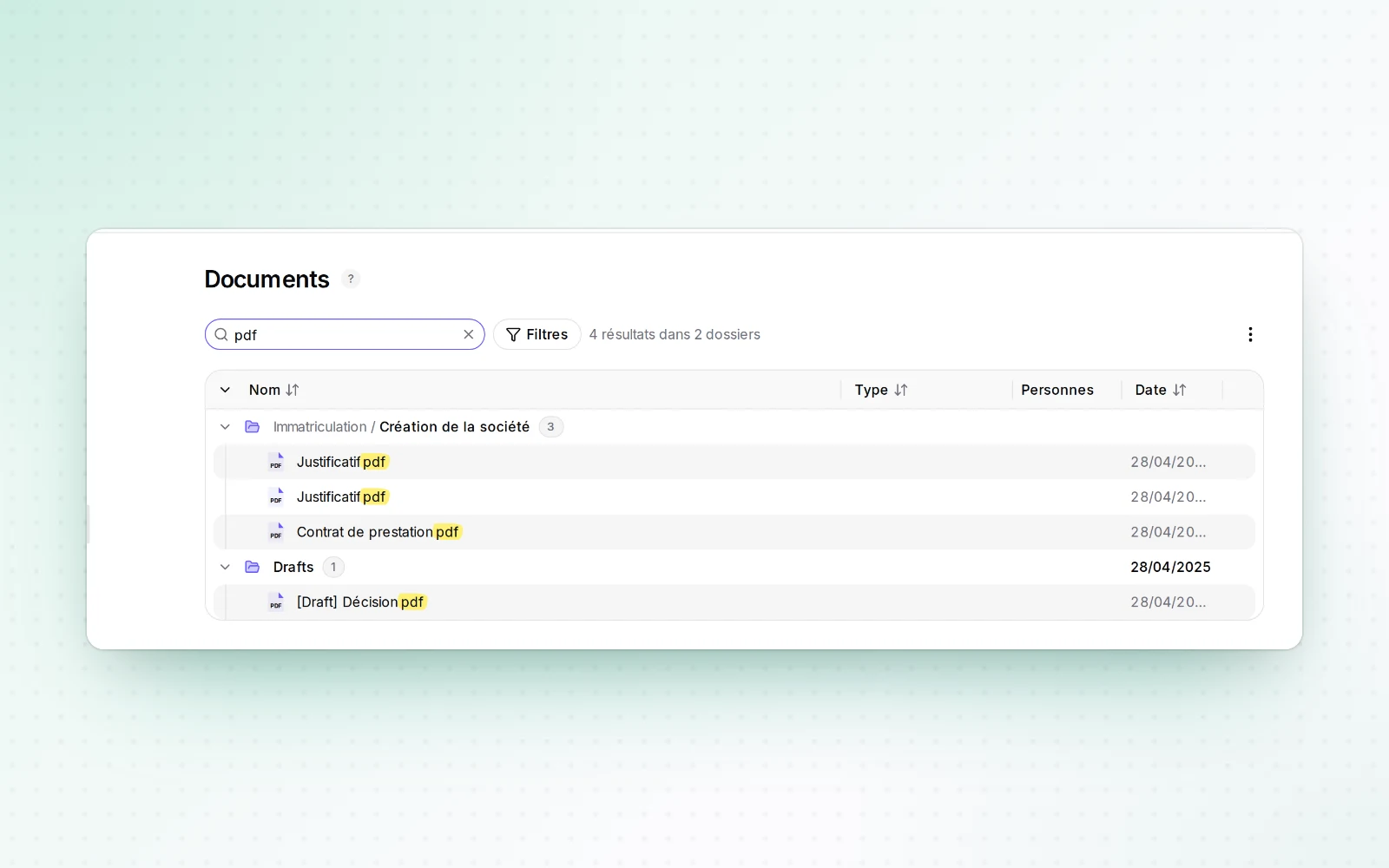
Search results appear in the folder tree, grouped by folder, with matching terms highlighted. You can use the view's actions there, drop files onto a result to import them, and open the preview with the space bar. Cut, paste, undo: every gesture works with the mouse or the keyboard, and the shortcut help lists everything the view allows.
Documents reserved for the members you choose
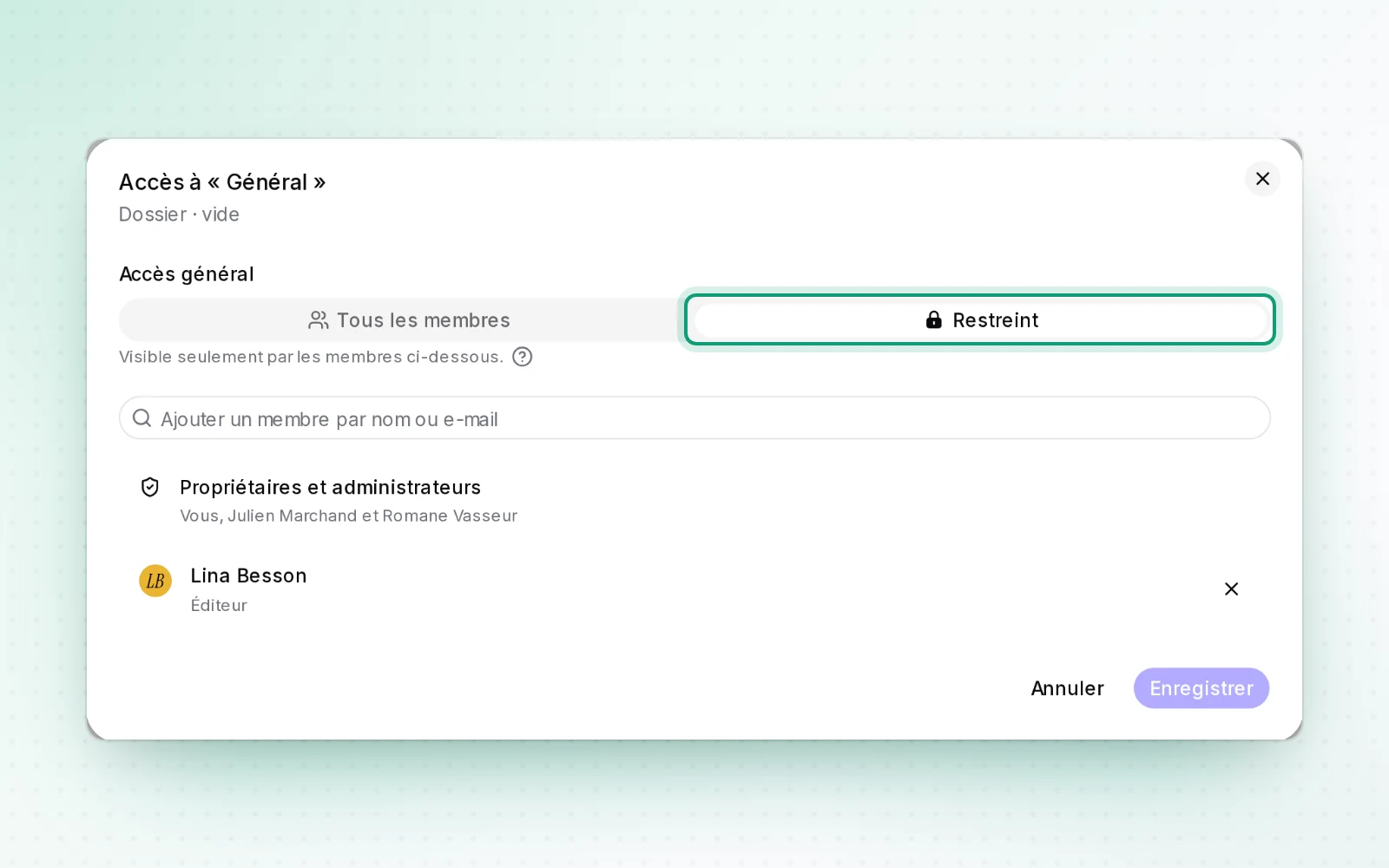
Owners and admins can restrict a document, a folder or a whole selection to the members they choose. The restriction follows nested content, previews and downloads; owners and admins keep their access. The "Restricted" view gathers these items and shows who can see each one.
All changes
The full list for this release, fixes included. Only changes our customers can see are listed.
New
Improved
- Documents
- Dismiss the INPI file retrieval banner once you no longer need it.
- After you close the preview, the last document you opened stays selected and visible.
- Preview DOCX, XLSX and CSV files directly in Documents.
- Tell folder levels apart at a glance, with guides and indentation.
- Tell empty folders apart from folders that hold documents.
- A folder holding only empty subfolders is shown as empty.
- Table headers stay in the page flow instead of covering the folder tree.
- Documents remembers your sort order and sorts folders by date.
- Search for a destination folder from the "Move to…" menu.
- Cut, copy and paste items in the folder tree from the keyboard.
- Right-click an empty area to create a folder or import a file.
- Empty folder icons are dimmed, so filled folders stand out.
- The selection bar follows the pattern of the share transfer register editor.
- The selection bar opens and closes smoothly, with no empty gap or extra line.
- Download several documents as a ZIP archive that keeps your folders.
- Column reset controls move from the tree header into the menus.
- People attached to a document are shown as a coloured dot.
- Screen readers announce items that were cut, moved or deleted.
- The toolbar groups the menus and shows how many items sit in the trash.
- The keyboard shortcut help lists the commands available in the view.
- The filter bar groups filters and lets you pick a date range.
- Pin a document for the whole company from the toolbar menu.
- Undo your recent actions on documents.
- The Documents card grows with the page and scrolls with it.
- On mid-width screens, the selection bar stays beside the transfers panel.
- In the preview, delete is easier to tell apart from download and edit.
- Create the destination folder from the "Move to…" dialog.
- Preview items in the trash and restore a whole folder.
- The folder tree exposes its structure and column sorting to assistive technology.
- Export the document index for a folder or a selection.
- Read your PDFs in place, with in-document search and page thumbnails.
- In a document's preview, the actions sit in one icon bar.
- The space bar closes a document's preview.
- Previews open locally, and the DOCX preview is isolated from the rest of the app.
- Links to INPI files stay stable while the folder tree is rebuilt.
- The "Move to…" dialog loads your folders in one go.
- Downloaded documents and folders carry the company name.
- The preview fetches a document's details in one go.
- The Alex AI conversation in the preview is refreshed, and long lists of people fold away.
- One restriction applies to a whole selection.
- Drop files onto a search result to import them.
- The "Restricted" view shows who can reach each document.
- Legal registers
- The register of decisions flags minutes filed elsewhere in Documents.
Fixed
- Documents
- Search keeps each company's data separate.
- Transfers carry on in their own panel.
- Selection bar and transfers stay aligned at the bottom.
- Table headers stay clear of the floating controls.
- Preview labels follow your interface language.
- Row alerts have an accessible name.
- The tooltip separates added members from total access.
- The tooltip counts each member once.
Maintenance
- Documents
- A single dot stands for the person attached.
- "To file" lists documents left at the root.